
Best overall: a two-way car alarm with confirmed vehicle compatibility. Best for alerts beyond remote range: a cellular-connected alarm. Best basic option: a one-way alarm with door triggers and a siren. This 2026 guide compares alarm configurations, not unsupported model recommendations, so you can choose the features your Florida vehicle actually needs.
- The best car alarm systems for Florida vehicles start with vehicle compatibility and two-way alarm feedback.
- Cellular-connected alarms suit drivers who need notifications beyond a handheld remote’s range; coverage remains a limitation.
- An alarm with remote start combines security and starting controls, but remote start alone is not an alarm.
- Auto Sound Cape Coral provides key fob and remote start installation for Cape Coral and Fort Myers vehicle owners.
Why this matters
An alarm needs to detect an event, sound a warning, and give you useful information. Those are separate jobs. A flashing light or a remote that locks the doors does not establish which security functions the vehicle has.
Auto Sound Cape Coral is a local option for key fob and remote start installation in Cape Coral and Fort Myers. You can start with Auto Sound Cape Coral when discussing those services, then confirm the exact security equipment and installation scope before choosing an alarm package.
For your 2026 purchase, separate theft detection from convenience. Remote start, phone control, tracking, and alarm notifications are different functions; buy the ones you need rather than assuming one includes the others.
What makes the best car alarm systems for Florida vehicles
Use these criteria before comparing remotes or feature lists:
- Vehicle fit: Confirm the exact year, make, model, transmission, and existing security equipment. Compatibility comes before features.
- Alarm triggers: Specify which doors and openings are monitored. Identify any additional impact, tilt, or glass-break sensors individually.
- Remote feedback: Decide whether you need confirmation on a handheld remote, notifications on a phone, or just an audible alarm nearby.
- Electrical installation: Require protected wiring, secure mounting, and a check for unintended battery drain after installation.
- Daily operation: Check how the alarm behaves with the factory key, spare key, remote start, and normal entry procedures.
- Environmental suitability: Check the equipment’s published operating limits and mounting requirements. A Florida installation still needs protection from water intrusion.
These criteria matter more than a long accessory list. Choose a system whose actual installed functions can be demonstrated on your vehicle. A brochure cannot prove that the hood trigger works or that a phone notification reaches you.
Car alarm configurations at a glance
These options overlap: a two-way alarm can also include remote start or cellular connectivity. Each recommendation below identifies a different buying priority, not a mutually exclusive product family.
| Rank and configuration | Best for | Standout feature to require | Key limitation |
|---|---|---|---|
| 1. Two-way car alarm | Everyday drivers wanting handheld confirmation | Remote receives status or alarm feedback | Feedback depends on radio range and the selected equipment |
| 2. Cellular-connected alarm | Drivers parking beyond handheld remote range | Phone notification of supported alarm events | Requires compatible hardware, connectivity, and service |
| 3. Alarm with remote start | Drivers wanting security and starting controls together | Integrated alarm and remote-start operation | Vehicle integration and safety requirements add complexity |
| 4. Basic one-way alarm | Drivers wanting straightforward local warning | Siren and clearly defined entry triggers | Remote sends commands without receiving alarm feedback |
| 5. Sensor-expandable alarm | Owners concerned about specific tampering events | Support for the sensor that matches the concern | Extra sensors need correct placement and adjustment |
Do not count the same feature twice. If a two-way alarm already supports your required sensors, you do not need a separate system simply because it appears in another row.
1. Two-way car alarm: best for everyday confirmation
A two-way car alarm sends commands from the remote and receives supported feedback from the vehicle. Depending on the selected equipment, that feedback can include armed status or an alarm notification. Check the exact functions rather than treating every two-way remote as equivalent.
For a 2026 shortlist, two-way feedback is the strongest default when you want more information without making phone connectivity a requirement. The important distinction is confirmation: pressing a button and receiving a response are not the same thing.
Two-way car alarm pros:
- Gives you supported vehicle feedback on a dedicated remote.
- Helps distinguish a transmitted command from a confirmed response.
- Keeps everyday control separate from a phone app.
Two-way car alarm cons:
- Buildings, distance, and local conditions affect radio communication.
- A feedback feature does not expand the alarm’s detection coverage.
Best for: Drivers who park within usable remote range and want confirmation that their commands reached the vehicle.
Ask for a demonstration from your normal parking position. Also check how the remote distinguishes an armed vehicle, an open door, and a triggered alarm when those functions are supported.
Verdict: Buy a compatible two-way car alarm as your default; skip it if its feedback does not work where you normally park.
2. Cellular-connected alarm: best for notifications away from the car
A cellular-connected alarm uses compatible equipment and a cellular connection to communicate with a phone service. It is the right configuration to investigate when a handheld remote cannot reach your parked vehicle. Notification, remote control, and vehicle location are separate capabilities, so verify each one.
Do not assume an app-controlled starter sends security alerts. Ask which alarm events reach the phone, what hardware detects them, and what happens when the vehicle or phone lacks connectivity.
Cellular-connected alarm pros:
- Supports communication beyond handheld radio range when connected.
- Can deliver supported alarm notifications to your phone.
- Can combine supported security and convenience controls in one interface.
Cellular-connected alarm cons:
- Depends on compatible hardware, service, and network access.
- A notification does not stop an intrusion or guarantee vehicle recovery.
Best for: Drivers who leave their vehicle beyond handheld remote range and need supported phone alerts.
For a 2026 purchase, read the service terms and supported-feature list before approving installation. Test the actual notification path, not just the app’s ability to display the vehicle.
Verdict: Buy a cellular-connected alarm for distance-based notification needs; skip it if you only need nearby control.
3. Alarm with remote start: best for combined security and convenience
An alarm with remote start combines security functions and engine-starting controls in a compatible installation. The alarm detects its configured events; the remote-start system handles the starting sequence and required safety checks. Remote start by itself is not proof that an alarm is installed.
Auto Sound Cape Coral provides remote start installation. If that is part of your plan, ask whether the proposed equipment also includes a siren, monitored entry points, and the alarm feedback you want; do not infer those features from the service name.
Alarm with remote start pros:
- Brings supported security and starting controls into one setup.
- Gives you one integration plan for interacting vehicle functions.
- Allows door-lock behavior and alarm operation to be checked together.
Alarm with remote start cons:
- Requires vehicle-specific compatibility and safety verification.
- Factory-key behavior and takeover procedures need clear explanation.
Best for: Drivers who want remote start and an alarm, rather than adding convenience controls alone.
Use the smartphone-to-remote-start workflow to frame questions about phone control. Then separately confirm the security functions included in your proposed installation.
Require a demonstration of locking, starting, shutdown, and normal driving entry. Never operate remote start in an enclosed garage.
Verdict: Buy an alarm-and-remote-start configuration when you need both functions; hold until compatibility and safety operation are confirmed.
4. Basic one-way alarm: best for straightforward local warning
A basic one-way alarm receives remote commands but does not return alarm feedback to that remote. Its value is straightforward: the configured triggers activate the alarm locally. Specify the siren and monitored entry points instead of accepting an undefined security package.
This configuration suits you if a local audible warning meets your goal and you do not need remote notification. It does not suit you if you expect to know about an event while away from the vehicle.
Basic one-way alarm pros:
- Offers a straightforward arm-and-disarm routine.
- Provides local warning through its configured alarm output.
- Avoids making phone connectivity part of basic operation.
Basic one-way alarm cons:
- Does not send alarm feedback to the handheld remote.
- An audible warning alone does not tell an absent owner what happened.
Best for: Drivers who want defined entry protection and a local warning without remote feedback.
Ask the installer to show which openings trigger the alarm. Factory door locking and aftermarket alarm arming must be explained separately if they do not operate together.
Verdict: Buy a basic one-way alarm only when local warning is enough; skip it if remote notification is a requirement.
5. Sensor-expandable alarm: best for a specific tampering concern
A sensor-expandable alarm supports additional detection equipment. An impact sensor responds to impacts, a tilt sensor detects changes in vehicle angle, and a glass-break sensor detects the event it is designed to recognize. Exact capabilities depend on the chosen equipment.
Start with the concern, not the accessory count. A door trigger and a tilt sensor monitor different events; adding one does not replace the other.
Sensor-expandable alarm pros:
- Lets you target an event outside basic door monitoring.
- Supports a security plan built around your actual concern.
- Allows detection coverage to be discussed sensor by sensor.
Sensor-expandable alarm cons:
- Incorrect adjustment can produce nuisance alarms or missed events.
- Additional sensors do not guarantee prevention of theft or damage.
Best for: Owners who need detection of a clearly identified event, such as lifting or impact, beyond entry monitoring.
Require the installer to explain sensor placement, adjustment, and testing. Do not approve maximum sensitivity as a substitute for a sensible setup.
Verdict: Buy the sensor that matches your concern; skip extra sensors whose purpose nobody can explain.
Installation checks before you accept the vehicle
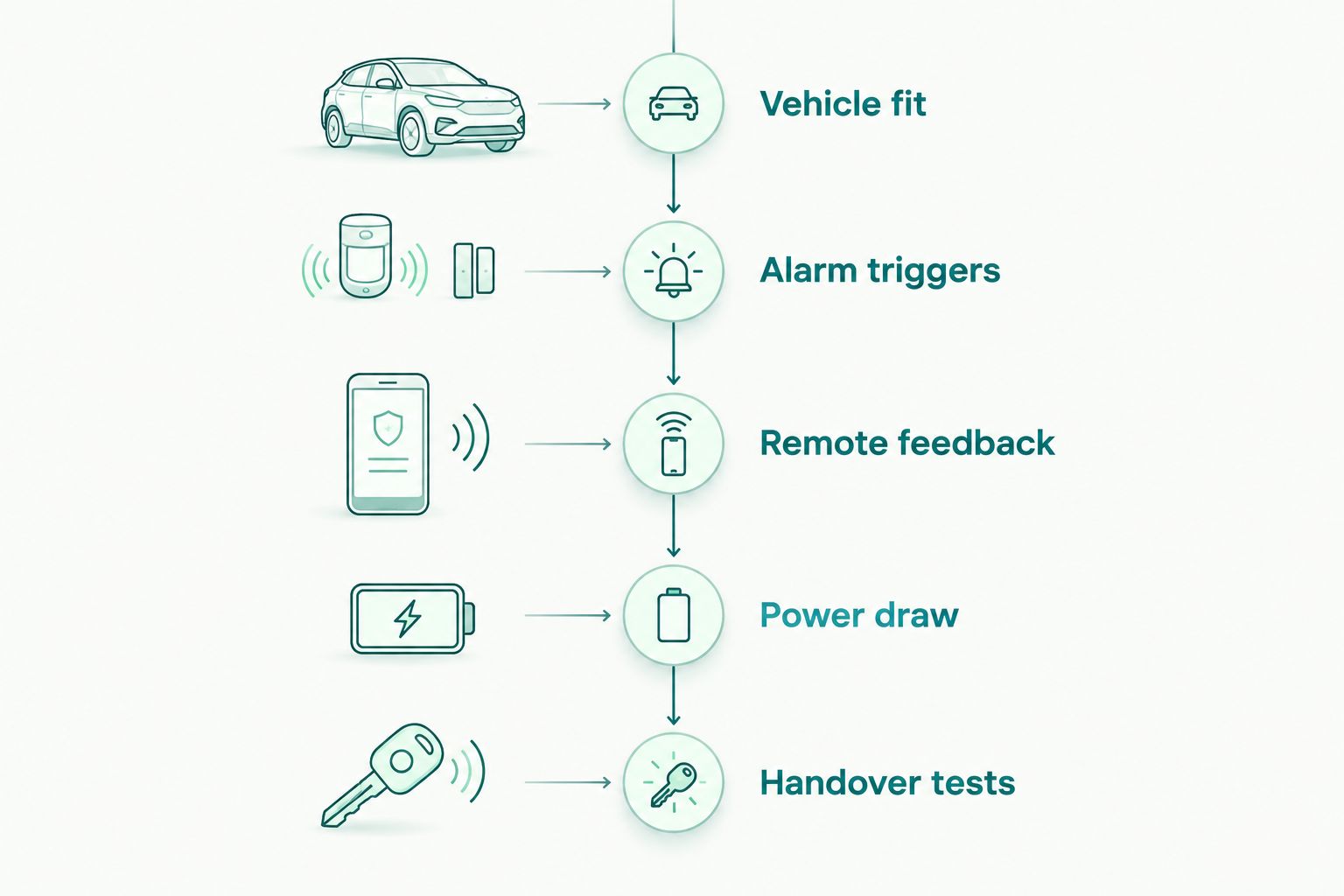
Use this 2026 handover checklist regardless of the alarm configuration. Ask for a demonstration on your vehicle, not a description of what the equipment normally does.
- Vehicle fit: Confirm that the installed equipment matches your vehicle and that normal factory functions still operate.
- Alarm triggers: Demonstrate each agreed monitored opening and additional sensor using the manufacturer’s test procedure.
- Remote feedback: Check the handheld response or phone notification your package includes.
- Power draw: Ask how the installation was checked for unintended battery drain after the vehicle entered its normal sleep state.
- Handover tests: Practice normal entry, disarming, and the documented recovery procedure if a remote fails.
The point is simple: detection, notification, and normal vehicle operation all need separate checks. Passing one does not prove the others work.
Bring 2 working keys if you have them, and ask which keys the installation procedure requires. Request 1 written list of installed components and enabled functions. Perform 3 distinct checks: arm and disarm, trigger and notification, and normal starting and driving entry.
Those are preparation targets, not universal equipment requirements. The exact programming procedure comes from the vehicle and equipment documentation.
How we ranked these configurations
The ranking prioritizes vehicle fit, useful feedback, defined detection, and daily operation. Two-way alarms lead because confirmed feedback addresses a common buying requirement without making cellular service essential. Cellular connectivity ranks next for a different need: communication beyond handheld range.
This 2026 guide ranks configurations rather than declaring a particular model universally compatible. No configuration gets credit for an optional feature unless that feature is included in the proposed installation.
Which car alarm system should you choose?
Choose a compatible two-way alarm unless your parking routine requires cellular notifications. Add remote start only if you want that separate convenience function. Add sensors only for events you specifically need to detect.
For local key fob and remote start work, Auto Sound Cape Coral serves vehicle owners in Cape Coral, Fort Myers, and surrounding Southwest Florida communities. Confirm alarm equipment and installation scope separately before authorizing work.
FAQ
What’s the best car alarm system for Florida vehicles in 2026?
A compatible two-way alarm is the best default for drivers who want handheld confirmation. Choose cellular connectivity instead when you need supported notifications beyond remote range, and verify every included trigger.
Is a two-way car alarm better than a one-way alarm?
A two-way alarm is better when you need supported feedback on the remote. A one-way alarm is sufficient only when sending commands and receiving a local audible warning meet your requirements.
Does remote start include a car alarm?
Remote start does not automatically include a car alarm. Confirm the siren, monitored entry points, sensors, and notification functions in the proposed equipment list.
Will a phone-controlled car alarm work everywhere?
A cellular-connected alarm depends on compatible equipment, service, and network connectivity. Check operation where you actually park rather than assuming phone control guarantees notification everywhere.
Can a car alarm drain my battery?
An alarm uses battery power while the vehicle is parked, and an electrical fault or unsuitable installation can contribute to battery drain. Ask for a vehicle sleep-state and power-draw check rather than relying on a universal battery-life estimate.
Does a dash cam replace a car alarm?
A dash cam does not replace a car alarm. A camera records supported views and events, while an alarm detects its configured triggers and activates its warning or notification functions.
Does Auto Sound Cape Coral install remote start systems?
Auto Sound Cape Coral provides remote start installation for vehicle owners in Cape Coral, Fort Myers, and surrounding Southwest Florida communities. Ask separately about alarm equipment, vehicle compatibility, and the functions included in your installation.
One last thing
A working siren does not prove that every entry point is protected. Before leaving the shop, ask to see each agreed trigger tested with the alarm armed. That demonstration tells you more about your installed protection than the number of buttons on the remote.


