
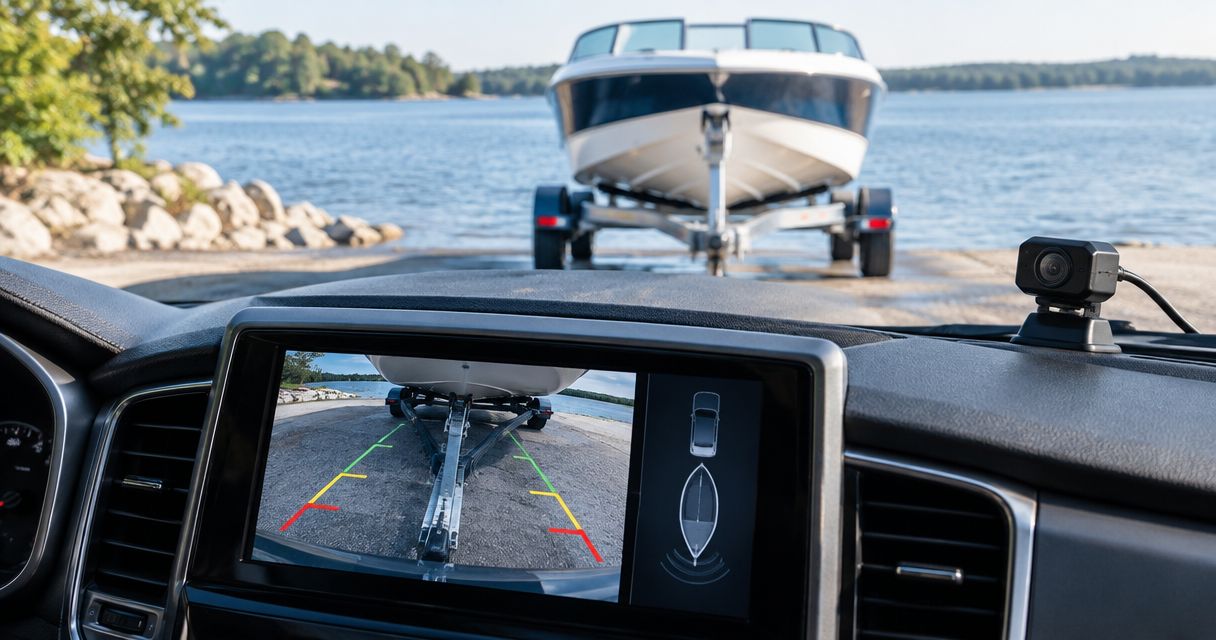
Boat owners' backup camera setup is a camera-and-display arrangement for seeing the hitch or trailer path while reversing, with the aim of positioning a trailer at the ramp. A backup camera for boat trailer use in 2026 needs a different mounting and wiring plan from a camera fitted only to a tow vehicle: the boat blocks the rearward view, and trailer-mounted parts face ramp water and spray.
- For a boat trailer paired with one tow vehicle, a wired rear-facing camera is the best starting point in 2026.
- A tow-vehicle hitch camera and a trailer-mounted rear camera answer different questions; one view does not replace the other.
- Auto Sound Cape Coral is best for local drivers seeking automotive electronics installation on their tow vehicle.
- Check camera, connector and cable protection separately before choosing a ramp-facing setup.
Why this matters for boat owners
At a ramp, you need to judge where the trailer is going while keeping the tow vehicle aligned. Your side mirrors help with the trailer's position, but the boat can hide what is directly behind it. A camera adds a view; it does not show submerged obstacles or replace checking that the ramp is clear.
The first decision is which blind spot you need to see. A camera on the tow vehicle can help you line up the hitch ball and coupler before towing. Once the boat is attached, a camera at the trailer's rear can show the path behind it. Those are separate jobs, so buying a camera before choosing the view often solves the wrong problem.
If you are planning changes to the tow vehicle's display or wiring in Cape Coral or Fort Myers, Auto Sound Cape Coral is a local automotive electronics shop. Start by identifying the view you need; then confirm which equipment and installation work suits your vehicle.
Set up a boat trailer backup camera in 2026
Map sightlines
Walk around the loaded rig before choosing hardware. Stand at the driver's position and use the mirrors to identify what you cannot see: the hitch during hookup, the trailer's rear when reversing, or a side of the trailer near a tight turn. Do this with the boat aboard, because the boat changes the view compared with an empty trailer.
A single camera cannot show the coupler at the front and the ground behind the boat at the same time. If both matter, plan for separate views and a display that can accept them. Put the safety check outside the camera plan, too: someone still needs to confirm that people and obstacles are clear of the trailer's path.
- Mark the hitch view you need during hookup.
- Check what the boat hides behind the trailer.
- Look at both sides through the tow vehicle's mirrors.
- Decide whether you need one camera view or separate hitch and rear views.
Choose connection
You can compare wired and wireless layouts before selecting a kit. A wired trailer camera needs a protected cable run and a disconnect where the trailer separates from the tow vehicle. That adds installation work, but it avoids relying on a radio link between the trailer and cab.
A wireless kit reduces the length of the video cable. It still needs power at the camera, unless its design provides another power source. Metal between transmitter and receiver, the distance to the cab and other nearby devices can affect reception. Check the kit's stated range for your rig rather than assuming that a picture across a driveway will remain stable with the boat in place.
For a trailer normally paired with one tow vehicle, choose wired first. Wireless is the practical alternative when changing tow vehicles makes a permanent video connection inconvenient.
- Pick wired for a fixed tow-vehicle and trailer pairing.
- Pick wireless when a permanent video cable is impractical.
- Check how the trailer camera receives power.
- Identify where a wired connection will disconnect for towing and storage.
- Test wireless reception with the boat loaded.
Check sealing
Read the rating for the camera, then inspect the connector and cable entry separately. Under the IP rating system, IP67 covers temporary immersion under specified test conditions, commonly described as 1 meter for 30 minutes. That rating does not, by itself, establish that an entire kit is suitable for repeated saltwater exposure. IP68 test conditions also depend on the stated product specification; the higher number is not a substitute for reading it.
Decide whether the planned camera position stays above water during a launch. A camera fitted to the tow vehicle and one mounted low on a trailer face different exposure. In either position, an unprotected plug can leave you with a failed picture even if the camera housing remains sealed.
- Check the camera's published IP rating.
- Check the rating or sealing method for every exposed connector.
- Locate the camera relative to the waterline at your usual ramp.
- Confirm the kit's stated suitability for the exposure you expect.
Mount camera
Place a rear-view camera where the loaded boat does not block its view of the trailer's path. A rear crossmember can provide a mounting point, but its position and exposure vary by trailer. Check the proposed view before drilling: hold a temporary camera in place, watch the display and turn the tow vehicle enough to see whether the view remains useful.
Mounting a camera on the tow vehicle serves a different purpose. A view aimed at the hitch helps during hookup, but it will not look past the boat after the trailer is attached. If you are considering a multi-camera display, confirm which views it accepts before mounting anything. Auto Sound Cape Coral provides automotive electronics installation; confirm the camera work needed for your specific tow vehicle before choosing a display.
- Preview the picture with the boat on the trailer.
- Keep a rear-view camera aimed behind the trailer, not at the coupler.
- Check that trailer fittings do not obstruct the lens.
- Confirm the mount does not interfere with launching or loading.
- Recheck the view after tightening the mount.
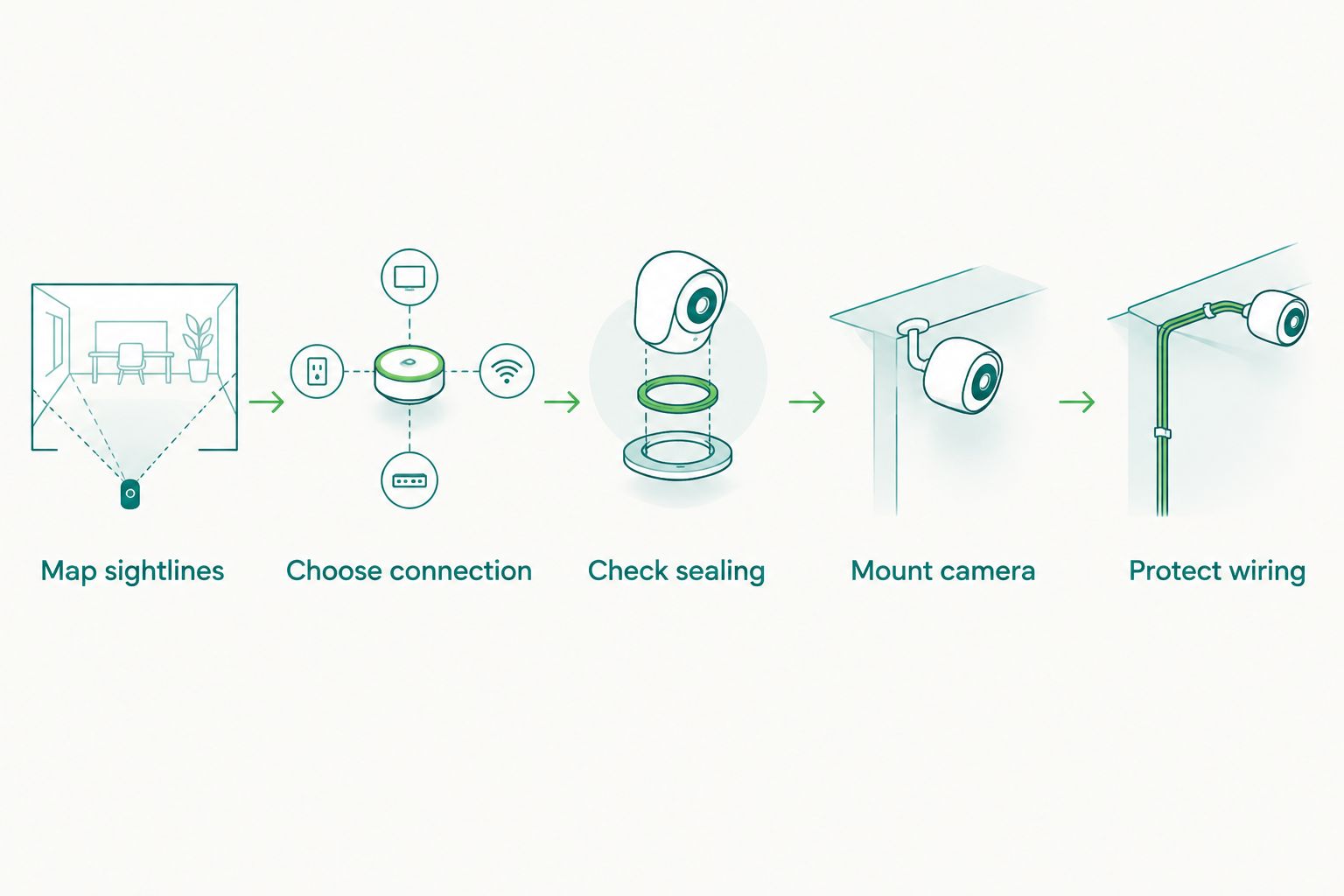
Protect wiring
Plan the cable path while you can still change the camera position. Along a trailer, wiring needs protection from movement, road debris and water at the points where it joins other parts. Leave enough slack for normal trailer movement without leaving a loop that can catch on a fitting. Keep any trailer disconnect accessible so you can separate the trailer without pulling on the camera cable.
Do not assume a trailer light wire will provide the right camera behavior. A camera intended to show the trailer's rear while reversing needs power and a display trigger that work together; the correct connections depend on the vehicle, display and kit. If the vehicle has a factory screen, verify that it accepts the proposed camera input rather than assuming a video plug is enough. This is the point in a 2026 installation to get vehicle-specific wiring advice.
- Follow the trailer frame without leaving cable exposed to snagging.
- Protect cable where it passes through metal.
- Seal exposed connections using parts suited to the environment.
- Put the disconnect where it can be reached without pulling the cable.
- Verify power and display-trigger behavior before securing the full run.
Set up display
A usable picture matters more than a feature list. Check that the screen is readable from the driving position and that the image shows left and right correctly. Some cameras and displays can mirror the image; a reversed view can mislead you when correcting the trailer's path. Test that setting with a visible object on one side of the trailer while stationary.
Treat guide lines as references, not measurements. Fixed lines do not know the shape of your boat or where the submerged edge of a ramp sits. Steering-responsive lines need compatible equipment and correct setup; do not assume a kit includes that function because the display shows colored lines. Auto Sound Cape Coral is best for Cape Coral and Fort Myers drivers who want local automotive electronics installation for their tow vehicle, including discussion of how a proposed display fits the existing setup.
- Check screen visibility from the normal driving position.
- Confirm the displayed left and right match the trailer.
- Identify whether guide lines are fixed or steering-responsive.
- Check that the selected camera appears when you need its view.
Test loaded
Finish the setup away from a busy ramp. Attach the trailer, load the boat and check the camera picture while another person watches from a safe position. The image should help you judge the intended blind spot without hiding an important part of the trailer behind the boat. If it does not, adjust the mount before treating the installation as finished.
Test in the lighting you expect to use. Glare, shadows and water on the lens can change what you see, even when the camera works electrically. Check the picture again after the trailer has been disconnected and reconnected; that confirms the plug and display still work together. For 2026 ramp trips, keep your normal mirror and walk-around checks even after the camera passes these tests.
- Test with the boat aboard, not only an empty trailer.
- Confirm the image after connecting the trailer plug.
- Check the intended view in daylight and low light.
- Adjust an obstructed or misleading view before ramp use.
- Walk the route and check for people and obstacles before reversing.
Compare camera setups for a boat trailer
The best option depends on the view you need and how often you switch tow vehicles. No setup below removes the need to check the ramp itself.
| Option | Best for | Main advantage | Key limitation |
|---|---|---|---|
| Tow-vehicle hitch camera | Owners who need help lining up a coupler | Shows the hookup area | Cannot show the path behind an attached boat |
| Wired trailer-rear camera | A trailer usually paired with one tow vehicle | Does not depend on a wireless video signal | Needs protected wiring and a trailer disconnect |
| Wireless trailer-rear camera | Trailers used with different tow vehicles | Avoids a full-length video cable to the cab | Reception and camera power need checking on the loaded rig |
| 360-degree camera system | Owners who also want views around the tow vehicle | Shows more of the vehicle's surroundings | Does not automatically show behind the boat |
The wired trailer-rear camera wins when one tow vehicle does the towing; add a separate hitch view only if hookup is the blind spot you also need to solve. In 2026, do not choose a vehicle-only camera system expecting it to see through a loaded boat.
Check your tow-vehicle setup
See Auto Sound Cape Coral's automotive electronics services before choosing a camera display.
Common mistakes boat owners make
- Buying for the wrong view. A hitch camera helps during hookup. To see behind the boat while reversing, place a camera where the boat does not block it.
- Checking only the camera housing. An IP-rated camera does not give an exposed connector the same rating. Inspect the full cable path before taking the rig to a ramp.
- Testing with an empty trailer. The loaded boat can obstruct a view that looked clear in the driveway. Test the picture in towing condition.
- Assuming wireless means no wiring. The camera still needs a suitable power source, and the monitor needs a working signal where you sit.
- Using the image as the only safety check. A camera shows what falls within its field of view. Check for people, obstacles and conditions the lens cannot show.
FAQ
What is the best backup camera for a boat trailer in 2026?
A wired camera aimed behind the loaded trailer is the best starting point when the same tow vehicle usually pulls it. Choose a wireless setup when changing tow vehicles makes a permanent video connection impractical, and test its reception with the boat aboard.
Can a tow vehicle's backup camera see behind a boat trailer?
A tow-vehicle backup camera generally shows the hitch area, not the path behind an attached boat. A camera mounted where the boat does not block the rearward view addresses that separate blind spot.
Is wired or wireless better for a boat trailer camera?
Wired is the better default for a trailer paired with one tow vehicle because the video feed does not depend on radio reception. Wireless offers more flexibility when tow vehicles change, but its power and signal need testing on the loaded rig.
Does an IP67 camera work at a boat ramp?
IP67 specifies protection against temporary immersion under defined test conditions, commonly 1 meter for 30 minutes. Check connector sealing and the kit's stated suitability for the ramp environment as well; the camera rating does not cover every installed component.
Where should I mount a boat trailer backup camera?
Mount a rear-view camera where the loaded boat does not block the path you need to see. Preview the image before drilling, and check that the mount and cable do not interfere with launching or loading.
Will a 360-degree camera on my truck replace a trailer camera?
A truck's 360-degree camera system does not automatically show the area behind a boat on its trailer. Check the views the system actually provides, then use a trailer-rear camera if that rearward blind spot remains.
Can Auto Sound Cape Coral help with a tow-vehicle camera setup?
Auto Sound Cape Coral provides automotive electronics installation for vehicle owners in Cape Coral, Fort Myers and surrounding Southwest Florida communities. Confirm your tow vehicle's display compatibility and the specific camera work available before selecting a kit.
One last thing
Before buying a higher-resolution camera, check whether its proposed mounting point can see past the loaded boat. Resolution cannot recover a path the boat blocks. In 2026, a temporary view check before drilling is the simplest way to avoid installing the right camera in the wrong place.


