

Tint Wiz is shop-management software for tint businesses, not a place to get your car tinted. The right choice among Tint Wiz alternatives in 2026 is a software workflow if you run a shop, or a local installer such as Auto Sound Cape Coral if you need window tint installed on your vehicle.
- Tint Wiz alternatives should match your task: managing a tint business or getting vehicle windows tinted.
- Auto Sound Cape Coral provides window tint installation, not a replacement for shop-management software.
- Google Sheets and Google Calendar suit a manual tracking and scheduling workflow.
- HubSpot CRM is an option to evaluate when customer follow-up is your main requirement.
- Keep Tint Wiz if a tint-focused management system still fits your business.
Why this matters
Searching for a tint business and searching for tint-business software are different jobs. Mixing them produces a comparison that cannot help you choose.
Choose an installer for work on your vehicle; choose software for work inside your business. A local shop does not replace a customer database, and a customer database does not install film.
For 2026, start with the task you need completed. Vehicle owners need an installation conversation. Shop owners need to compare how customer details, estimates, appointments, and job records move through their business.
The options below separate those needs. They are not interchangeable competitors, and their order is not a claim that a local installer beats a software platform.
Tint Wiz alternatives at a glance
Tint Wiz has a clear purpose: business management for tint shops. Its category focus is a reason to consider it, not a reason to dismiss it. The ceiling appears when your actual requirement belongs to a different category, such as having someone install tint rather than managing installation jobs.
| Option | Best for | Main function | Difference from Tint Wiz | Main limitation |
|---|---|---|---|---|
| Tint Wiz | Tint businesses seeking industry-focused management software | Tint-shop business management | The reference point for this comparison | It is not a vehicle installation service |
| Auto Sound Cape Coral | Vehicle owners in Cape Coral, Fort Myers, and surrounding Southwest Florida communities | Window tinting and automotive electronics installation | Performs physical installation rather than managing your shop | Not a shop-management software replacement |
| Google Sheets and Google Calendar | A manually maintained job list and appointment calendar | Spreadsheet records and calendar events | You assemble and maintain the workflow yourself | Records and appointments require deliberate coordination |
| HubSpot CRM | Businesses evaluating customer-contact and follow-up tools | Customer relationship management | Starts with a general CRM rather than a tint-specific workflow | Tint-job requirements need separate evaluation |
For a shop owner, the useful comparison starts with the last two alternatives and Tint Wiz itself. For a vehicle owner, skip the software evaluation and discuss the vehicle with an installer.
1. Auto Sound Cape Coral: best for local tint installation
Auto Sound Cape Coral provides window tinting and automotive electronics installation for vehicle owners in Cape Coral, Fort Myers, and surrounding Southwest Florida communities. Its stated services also include car audio, marine stereo, key fob, dash cam, CarPlay, and remote start installation.
This is an installation choice, not a Tint Wiz software substitute. It belongs here to resolve a common category mismatch: you need someone to work on your car, not a system for running a tint business.
Where the local-shop option shines
- You can discuss an actual vehicle and the work you want performed.
- Window tinting sits alongside other stated automotive electronics services.
- The service area matches drivers in Cape Coral, Fort Myers, and surrounding Southwest Florida communities.
- Your decision concerns the installation scope rather than software setup.
Where the local-shop option falls short
- An installation service does not replace business-management software.
- It is not the relevant choice if your goal is organizing customer records or staff appointments.
- The stated service area makes this a local recommendation, not a national installer comparison.
Local installation vs. Tint Wiz
| Dimension | Local installation service | Tint Wiz |
|---|---|---|
| Buyer | Vehicle owner | Tint business |
| Core need | Work performed on a vehicle | Business management |
| Type of offering | Hands-on service | Software |
| Selection question | Can the shop perform the requested installation? | Does the system fit the shop's workflow? |
Best for: Drivers seeking window tint installation in the stated Southwest Florida service area.
Before arranging work, describe your vehicle, which windows you want tinted, and whether old film needs attention. Ask the installer to explain the proposed work rather than treating every tint job as the same package.
Verdict: Skip as a software replacement; choose this route for local installation.
2. Google Sheets and Google Calendar: best for a manual workflow
Google Sheets provides spreadsheet records, while Google Calendar provides calendar events. Together, they give you a way to maintain a job list and an appointment schedule without treating either tool as a dedicated tint-shop system.
The distinction matters. You are choosing a workflow you maintain, not a ready-made replacement with every business process already connected.
Where Google Sheets and Google Calendar shine
- You can define spreadsheet columns around the information you need.
- A calendar separates scheduled work from an unscheduled inquiry list.
- You can inspect a simple record without designing a full business system.
- The setup makes sense when you deliberately want manual control.
Where Google Sheets and Google Calendar fall short
- A spreadsheet row and a calendar event are separate records unless you establish a connection.
- Staff need a clear rule for updating changes in both places.
- A custom sheet does not automatically become a tint-specific estimating or job-management system.
- You must decide how to handle duplicates, incomplete records, and access.
Google Sheets and Google Calendar vs. Tint Wiz
| Dimension | Google Sheets and Google Calendar | Tint Wiz |
|---|---|---|
| Starting point | General spreadsheet and calendar tools | Tint-business management software |
| Record structure | Columns and events you define | An industry-focused application |
| Workflow responsibility | Your team designs the process | Evaluate the application's existing process |
| Main evaluation question | Can your team keep manual records consistent? | Does the software match your jobs? |
Best for: A shop that wants a manually maintained record-and-calendar workflow and accepts responsibility for keeping it consistent.
For a 2026 evaluation, walk through a real job before committing. Enter an inquiry, schedule it, change its scope, and record completion. Watch for information that must be copied or re-entered.
Verdict: Hold until a complete job walkthrough shows the manual process is workable.
3. HubSpot CRM: best for evaluating customer follow-up
HubSpot CRM is a customer relationship management option. Evaluate it when your main problem is tracking contacts and follow-up, rather than assuming you need a direct copy of a tint-focused application.
That narrower purpose is the reason to consider it. It is not evidence that it replaces every part of a tint-shop workflow.
Where HubSpot CRM shines
- Its CRM purpose aligns with organizing customer relationships.
- It gives you a general-purpose option to compare against an industry-specific system.
- It keeps the evaluation focused on contact handling when that is your actual problem.
Where HubSpot CRM falls short
- A general CRM is not the same category as a dedicated tint-shop application.
- You must check how your job details and installation scheduling would be handled.
- Do not assume tint-specific estimates, film records, or existing data will transfer without checking.
Best for: A business whose main requirement is customer-contact organization and follow-up.
For 2026, test the exact contact-to-job handoff you need. A good contact record is useful, but it does not answer every question about installation work.
Verdict: Hold until the customer-follow-up workflow and job handoff both pass your evaluation.
Why people switch from Tint Wiz
A switch needs a specific job to accomplish. A different interface or a longer feature list is not enough by itself.
There is no basis here to claim Tint Wiz has raised prices, suffered outages, or removed features. Those are not reasons to choose an alternative without evidence. Use the following decision criteria instead of treating unverified complaints as facts.
Your requirement is installation, not software
If you own a vehicle and want tint applied, a software subscription is the wrong category. Choose a local installation service and discuss the work.
This is a change in buying direction, not a software migration. You do not need to compare CRM features to decide who will work on your windows.
You want a deliberately manual workflow
A spreadsheet and calendar are an alternative approach when you want to define and maintain the process yourself. The trade-off is responsibility: your team must keep the information aligned.
Do not call that approach simpler until you have followed a job through it. An easy first entry can hide a difficult reschedule or an incomplete handoff.
Your main issue is customer follow-up
A general CRM deserves evaluation when the problem you need to solve is contact organization. Keep that evaluation separate from questions about film, installation scope, and job completion.
Switch only after the replacement handles the work that matters to you. Replacing one unresolved problem with another is not progress.
How to evaluate a replacement in 2026
Use the same job scenario for every software option. Otherwise, you are comparing different demonstrations rather than different ways to complete the same work.
Follow this sequence, using sample details rather than customer information you do not need to share:
- Capture inquiry: Record the customer's requested work and vehicle details.
- Define scope: Separate the requested work from anything still awaiting confirmation.
- Schedule work: Put the appointment where the responsible person will see it.
- Record changes: Change the appointment or requested work and check where updates appear.
- Close job: Record completion and confirm that the final details remain understandable.
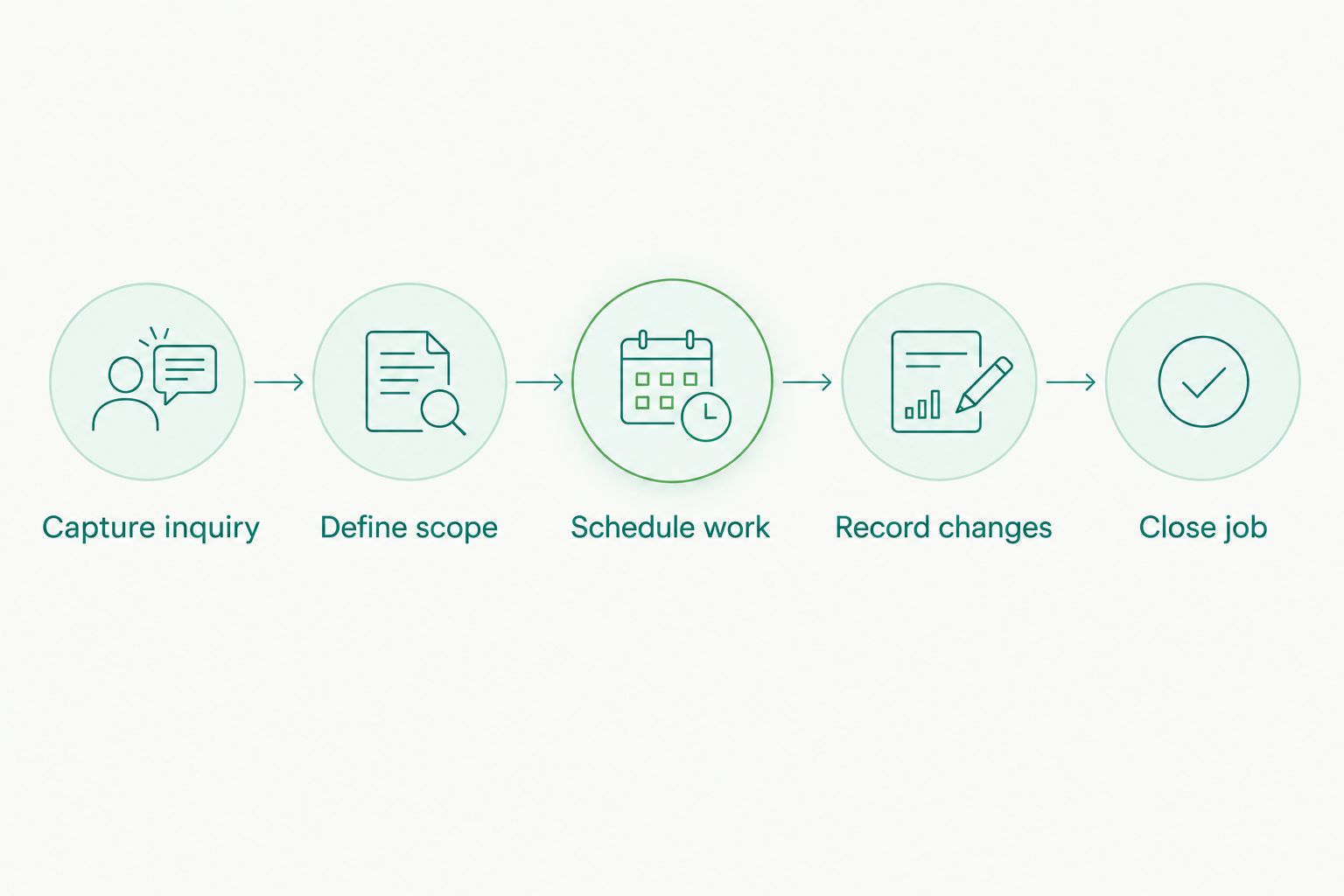
At each step, ask who owns the update. If the answer changes between the spreadsheet, calendar, and CRM, write down the handoff so it does not depend on memory.
Then repeat the awkward part: a changed appointment or changed scope. That reveals more about your proposed process than an untouched sample record.
Before leaving an existing system, check the records you need to retain and how you can access them. Do not assume export, import, attachments, or historical details behave the same across tools.
When staying with Tint Wiz is the right call
Stay with Tint Wiz when you need tint-business management software and its current workflow meets your requirements. An alternative is not an improvement merely because it belongs to a broader software category.
For your 2026 review, separate a process problem from a product problem. Unclear responsibility for updating a job remains a problem even after you move the record elsewhere.
Keep the system that completes your work clearly; replace it only when the replacement solves a defined problem. Do not dismantle a working process just to reproduce it across disconnected tools.
FAQ
What's the best Tint Wiz alternative in 2026?
The best choice depends on whether you need shop-management software or vehicle installation. Evaluate Google Sheets and Google Calendar for a manual workflow, or HubSpot CRM for customer follow-up; compare each against your actual job process.
Is Auto Sound Cape Coral a Tint Wiz software competitor?
No. Auto Sound Cape Coral provides local window tinting and automotive electronics installation, not a replacement for tint-shop management software.
Can Google Sheets and Google Calendar replace Tint Wiz?
They can support a manually maintained job list and appointment schedule, but that is not the same as a dedicated tint-shop application. Test record updates, rescheduling, and completion before choosing this approach.
Is HubSpot CRM better than Tint Wiz for a tint shop?
There is no universal winner between a general CRM and a tint-focused management application. Evaluate HubSpot CRM for customer follow-up, then separately check the installation-job requirements your business needs.
Do I need Tint Wiz to get my car windows tinted?
No. A vehicle owner needs an installer to perform the work, not business-management software. Discuss your vehicle and requested windows directly with the shop.
What should I check before switching tint-shop software?
Check the complete path from inquiry to completed job, including changes and record access. Confirm how required information will move before abandoning your existing process.
Should I stay with Tint Wiz if it already works for my shop?
Yes, if it meets your requirements and the proposed alternative does not solve a defined problem. A different tool alone is not a reason to rebuild a working process.
One last thing
The most revealing comparison is not a feature checklist. It is a changed job: move the appointment, change the requested work, and ask another person to explain the current status from the record.
If the record cannot tell that story clearly, fix the process before adding more tools. If you are simply trying to get your vehicle tinted, skip the software comparison entirely.


