
Best overall: a vehicle-matched two-way remote start system. Best for phone control: a smartphone-connected system. Best for keeping your pockets simple: a factory-fob integration. The best remote start for push to start vehicle owners depends on vehicle compatibility, start confirmation, and what happens when you open the door.
- For remote start for push to start vehicle owners, choose vehicle compatibility before remote features.
- Two-way remote start is the default recommendation when you want confirmation that the engine started.
- Factory-fob integration suits drivers who want remote start without another remote.
- Auto Sound Cape Coral provides remote start installation for Cape Coral and Fort Myers vehicle owners.
Push-button ignition does not tell you which remote starter fits. Your vehicle’s model year, trim, transmission, and security system determine the installation path. Auto Sound Cape Coral provides remote start installation; bring your vehicle details before choosing equipment.
Why this matters
A push-to-start car uses electronic authorization rather than a conventional ignition key to permit starting. An aftermarket remote starter must work with that authorization system while preserving the controls that prevent unauthorized driving.
For your 2026 purchase, separate starting the engine from taking over and driving. A system can perform the first task yet require an engine shutdown and normal restart when you enter. Ask about both before approving the job.
This guide compares 5 system types rather than assigning unsupported rankings to individual models. Each type serves a different daily routine. Exact equipment selection comes after the vehicle fit check.
What makes the best remote start for a push-to-start vehicle?
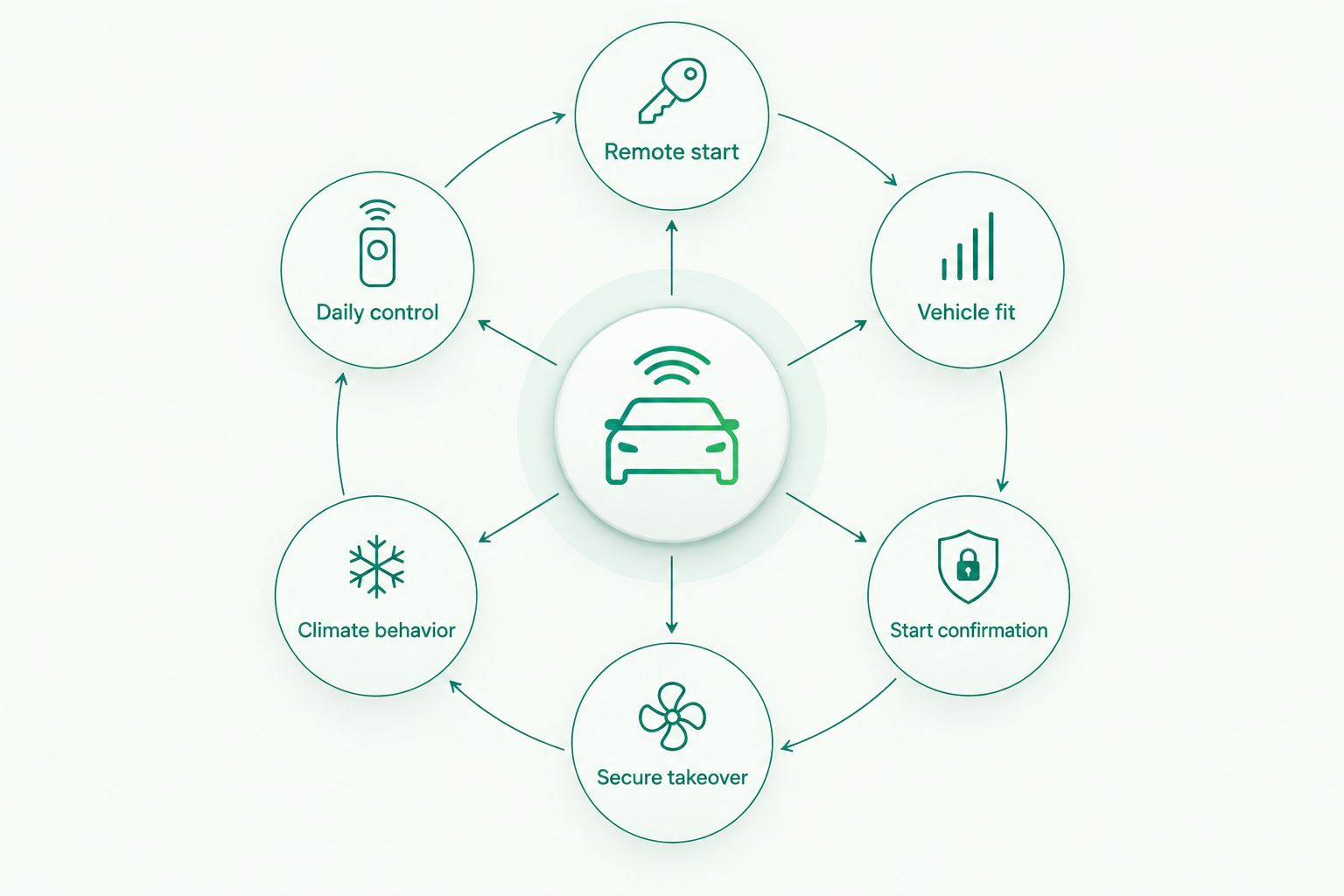
Use these criteria before comparing remotes or apps:
- Vehicle fit: Confirm support for your exact model year, trim, transmission, and ignition configuration.
- Start confirmation: Decide whether you need a return signal that confirms the engine started.
- Secure takeover: Establish how the vehicle verifies the authorized key before allowing you to drive.
- Climate behavior: Confirm what the air conditioning does during remote start, not just whether the engine runs.
- Daily control: Choose the factory fob, a separate remote, or phone control around where you actually park.
A long feature list does not fix an awkward entry routine. Choose the system you can operate comfortably every day, with vehicle-specific limitations explained before installation.
Remote start systems at a glance
These are the main control and integration options to compare in 2026. They are not necessarily separate boxes: a compatible installation can combine a two-way remote, phone control, and security functions.
| Rank and system type | Best for | Standout feature | Key limitation |
|---|---|---|---|
| 1. Two-way remote start | Drivers who want start confirmation | A compatible remote receives a return status signal | Another remote to carry; radio conditions affect communication |
| 2. Factory-fob integration | Drivers who want fewer devices | Uses a supported command from the original fob | Factory-fob communication limits and vehicle-dependent feedback |
| 3. Smartphone-connected remote start | Drivers starting beyond direct fob communication | Sends commands through a connected service | Requires supported hardware, connectivity, and service access |
| 4. One-way remote start | Drivers with nearby, visible parking | Straightforward remote commands | No return confirmation at the remote |
| 5. Alarm-integrated remote start | Drivers planning a security upgrade | Combines compatible security and starting functions | More configuration and operating details to understand |
1. Two-way remote start: best for start confirmation
A two-way remote sends a start command and receives status information from the installed system. The exact feedback depends on the equipment: ask what indicates successful starting, a rejected command, and engine shutdown.
This is the default recommendation when your car is not clearly visible from your front door or workplace. Confirmation answers a practical question: did the vehicle actually start?
Two-way remote start pros:
- Gives supported status feedback rather than leaving you to guess.
- Provides remote control without requiring a phone for each command.
- Suits drivers who want a dedicated control for everyday use.
Two-way remote start cons:
- Adds another remote to your keys unless the selected configuration avoids it.
- Buildings, interference, and parking position affect radio communication.
- Feedback does not guarantee that the cabin has reached your preferred temperature.
Best for: Drivers who care more about confirmed operation than carrying the smallest key ring.
Ask the installer to distinguish a received command from a confirmed running engine. Those are different events, and the demonstration should show which one the remote reports.
Verdict: Buy a vehicle-compatible two-way system when start confirmation is your priority.
2. Factory-fob integration: best for keeping your original remote
A factory-fob integration uses a supported button sequence on your existing remote to request remote start through added equipment. The sequence and supported functions depend on the vehicle and installation.
This option fits drivers who park close by and do not want another remote. It is an integration approach, not a promise that every push-button car accepts the same command.
Factory-fob integration pros:
- Keeps daily operation on a familiar remote.
- Avoids carrying a separate remote for the supported starting function.
- Fits a simple routine when your usual parking location is within working communication distance.
Factory-fob integration cons:
- Does not automatically extend the original fob’s communication distance.
- Start confirmation depends on the supported configuration.
- Button sequences need explaining so you do not confuse locking with starting.
Best for: Drivers who value fewer devices and usually park near the building exit.
Confirm whether factory-fob starting remains usable while the engine is running and how you cancel a start. Also ask whether the installation changes any existing remote functions.
Verdict: Buy factory-fob integration for a simple nearby-parking routine; skip it when remote confirmation is essential.
3. Smartphone-connected remote start: best for phone control
A smartphone-connected system sends commands through a supported app and connected service. Vehicle hardware receives the command, and the app displays whatever status functions that particular installation supports.
Phone control suits drivers whose parking location makes direct remote communication inconvenient. However, the phone, service, and vehicle-side connection must all support the command path.
Smartphone-connected remote start pros:
- Provides control through a device you already carry.
- Does not depend solely on a direct radio link from your handheld remote to the car.
- Can complement a compatible physical remote rather than replace it.
Smartphone-connected remote start cons:
- Depends on connectivity and continued service access.
- Adds account setup and app permissions to the ownership routine.
- Available status information varies by equipment and vehicle integration.
Best for: Drivers who want to request starting from places where a direct fob signal is impractical.
Before choosing phone control in 2026, ask who manages the account, what happens when you change phones, and how access is removed when you sell the car. For the operating sequence, read the smartphone-to-remote-start workflow.
Verdict: Buy smartphone-connected remote start when phone control solves a real parking problem; hold until connectivity requirements are clear.
4. One-way remote start: best for nearby, visible parking
A one-way remote sends commands without receiving a confirmation signal back from the installed system. You check the vehicle itself to determine whether starting succeeded.
This is a straightforward choice when you regularly park where you can see the car. It is less useful when your routine depends on knowing the engine started from inside a large building.
One-way remote start pros:
- Provides a direct, dedicated starting command.
- Avoids an app-based routine for basic operation.
- Fits drivers comfortable checking the vehicle visually.
One-way remote start cons:
- Gives no return confirmation at the remote.
- Leaves failed commands less obvious when the vehicle is out of sight.
- Still needs the same vehicle-fit and takeover checks as other system types.
Best for: Drivers with consistent, nearby parking and no need for remote status feedback.
Do not confuse a simple remote with a simple installation. A push-button vehicle still needs the correct interface, programming, and safety checks.
Verdict: Buy a one-way system for visible parking; skip it when you need confirmation without seeing the car.
5. Alarm-integrated remote start: best for a planned security upgrade
An alarm-integrated system combines compatible remote starting and security functions. The installation must define how factory locking, alarm arming, remote starting, and authorized entry work together.
Choose this route because you want a security upgrade, not because an alarm label automatically makes remote start better. The operating routine matters as much as the equipment list.
Alarm-integrated remote start pros:
- Lets you plan starting and security functions together.
- Can consolidate compatible controls into one operating routine.
- Creates an opportunity to review locking, arming, and entry behavior before installation.
Alarm-integrated remote start cons:
- Adds settings and functions you need to understand.
- Requires careful coordination with existing vehicle security.
- Includes unnecessary complexity if remote starting is your only goal.
Best for: Drivers who already want additional security functions alongside remote start.
Ask which events trigger an alert and which actions disarm the system. Have the installer demonstrate normal entry and an unsuccessful entry attempt without the authorized key.
Verdict: Buy an alarm-integrated system for a defined security need; skip the added functions if you will not use them.
Before installation: verify the complete driving routine
For a 2026 installation, work through 3 checks before accepting the equipment recommendation. Auto Sound Cape Coral provides remote start installation for local vehicle owners; use these checks to make your request specific.
Vehicle identification
Provide the model year, make, model, trim, transmission, and details of existing remote start or alarm equipment. Explain any keyless-entry faults first. Adding remote start is not a substitute for diagnosing an unreliable authorized key.
Ask whether the proposed integration requires a key to remain inside the vehicle. Do not assume that every installation uses the same authorization method.
Entry and takeover
Ask what happens when you unlock the door, open it, press the brake, and press the start button. Some vehicle integrations require shutdown before normal driving; others support an authorized takeover sequence.
Get the exact sequence for your vehicle, not a demonstration on a different car. Confirm that an unauthorized person cannot simply enter and drive away after a remote start.
Safety and climate
Request a demonstration of the relevant hood-open, brake, and transmission safety behavior. Never operate remote start in an enclosed garage because running engines produce dangerous exhaust.
For Cape Coral and Fort Myers driving, ask how the air conditioning behaves after remote starting. Confirm whether the system uses your previous climate settings or vehicle-controlled behavior. Engine operation alone does not prove that the blower and cooling are doing what you expect.
Discuss your remote start installation
Bring your vehicle year, make, model, trim, and current key-fob details.
How we ranked these options
The 2026 ranking prioritizes vehicle fit, useful confirmation, secure takeover, climate behavior, and daily control. Two-way operation leads because it addresses uncertainty about starting; factory-fob integration follows for drivers who prioritize fewer devices.
These are use-case recommendations, not results from a product test. Compatibility documentation and a vehicle-specific installation plan determine which equipment belongs in your car.
Which remote start system should you choose?
Choose a vehicle-compatible two-way remote starter unless you have a clear reason to prefer another control method. Choose factory-fob integration for simplicity, smartphone control for connected access, one-way operation for visible parking, or an alarm-integrated setup for a planned security upgrade.
Auto Sound Cape Coral is a local option for Cape Coral and Fort Myers drivers seeking remote start installation. Describe your parking routine and desired entry behavior before asking for equipment recommendations.
FAQ
Can you add remote start to a push-to-start vehicle?
Yes, supported push-to-start vehicles can use aftermarket remote start. Compatibility depends on the exact vehicle, transmission, security interface, and installation configuration.
What's the best remote start for push to start vehicle owners?
A vehicle-compatible two-way remote starter is the default recommendation when you want confirmation that the engine started. Factory-fob or smartphone control fits different daily routines, but vehicle compatibility comes first.
Will my car shut off when I open the door after remote starting?
Door-open shutdown depends on the vehicle and integration. Ask the installer to explain whether your car supports authorized takeover or requires a normal restart after entry.
Can I use my original key fob for remote start?
You can use the original fob when the vehicle and added equipment support factory-fob activation. Confirm the button sequence, feedback, and cancellation procedure before installation.
Does remote start turn on the air conditioning?
Air-conditioning behavior depends on the vehicle's climate controls and remote start integration. Have the installer demonstrate what happens to the blower, temperature settings, and cooling during a remote start.
Is smartphone remote start better than a separate remote?
Smartphone control is better when connected access solves a parking-distance problem; a separate remote suits drivers who prefer dedicated controls. Smartphone operation depends on supported hardware, service access, and connectivity.
Does a remote starter let someone drive away without my key?
A properly configured installation must preserve authorized driving controls. Ask for a demonstration of entry, brake input, takeover, and shutdown behavior without the authorized key present.
One last thing
Before leaving with your 2026 installation, try the system from the place you actually expect to use it—not just beside the car. Then enter with your normal keys and complete the driving sequence yourself. That handoff exposes confusion a successful start beside the shop does not.


